Search the Community
Showing results for tags 'tutorial'.
-
Many of you have been frustrated with the inability to add a pic to a PM (Private Message) from your INBOX! When you try you get the following message: You have been told, in the past, that only images from a website with a URL can be posted. Well guess what.... There is a backdoor option you can use to add any pic or image that resides on your phone, tablet, computer, etc. Although this may seem to be a tedious way to merely add an image, it at least gives you the option. (By the way.....I have been using this method when I figured it out years ago) Here are the steps to take: **REMEMBER to close the "Start New Topic" window you had previously started to obtain access to your pic for posting.
-
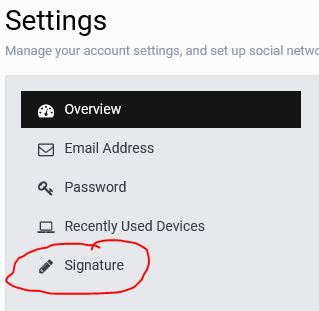
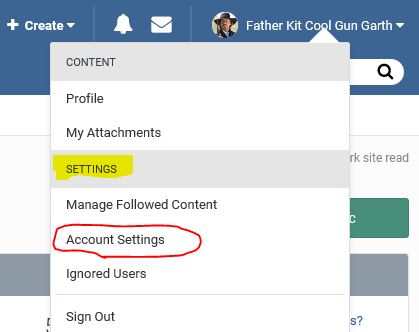
To make changes to your signature, follow these steps: STEP 1. Find your Avatar in the upper right hand corner of your screen. Click on the down arrow at the end. STEP 2. On the Drop Down Menu, under SETTINGS, Click on Account Settings. STEP 3. This will open up the Settings screen where you will Click on the Signature icon. STEP 4. On the right hand side of the screen, you can type the text you wish to add, and if you want to add a picture, be sure to FIRST save it to your computer so you can find it when you Click the choose files.... option. AND REMEMBER TO SAVE YOUR CHANGES.

-
- 3
-
-
This THREAD is primarily for those who are New Shooters and want to learn more about navigating the vast landscape that is the SASS FORUMS, but can also be informational for those who are unaware of its capabilities. When I do research on THREADS, in particular, ones that appear on the SASS WIRE, I primarily use the Search Options in the upper right hand corner of the Forum Screen: Ms. Allie Mo was kind enough to “pin” a THREAD with instructions on this: Although this feature is excellent for finding a THREAD based on topics you are interested in, or finding Members, there are times when I am looking for something that is date related. For this feature I use the “paging” system found on each FORUM just above the first “pinned” THREAD. As of the date of this THREAD, there are 1,086 pages of THREADS that are accessible to you. Each page contains 35 THREADS. That’s 38,010 THREADS, with 15 of the earliest being dated December 31, 1969, with one dated May 12, 2007, and the balance beginning on November 9, 2009 through current. Clicking on any of the page numbers shown will take you to that particular page. Choosing NEXT will cycle you to the next page. Choosing the right side " ” Icon will take you to the Last Page: Likewise choosing the left side “ ” Icon, when shown, will take you back to the First Page. Trying to get to a particular page quickly by using the NEXT Icon is laborious at best. What many may not be aware of, is the option to “jump” to a particular page. To do this, merely choose the drop down arrow: next to the last page number shown. Doing so gives you a place to type the page number you are looking for, then click the GO button. VOILA….and you are there. HOPE this helps those who may be interested.
-
- for new shooters
- informational
-
(and 1 more)
Tagged with: